[
macOS · iPhone · no jailbreak
]
Put your iPhone anywhere in the world
Waypoint is a Mac app that changes the location your iPhone reports. Teleport to a pin — or travel real roads at real speed limits, braking for lights and stop signs, arriving when Maps says you would.
[
macOS · iPhone · no jailbreak
]
Put your iPhone anywhere in the world
Waypoint is a Mac app that changes the location your iPhone reports. Teleport to a pin — or travel real roads at real speed limits, braking for lights and stop signs, arriving when Maps says you would.
[
macOS · iPhone · no jailbreak
]
Put your iPhone anywhere in the world
Waypoint is a Mac app that changes the location your iPhone reports. Teleport to a pin — or travel real roads at real speed limits, braking for lights and stop signs, arriving when Maps says you would.

[
the difference
]
Most location tools give themselves away
Most location tools give themselves away
Here is what the usual approaches look like from the outside — and what Waypoint does instead.
Teleport-only tools
Your dot jumps 500 miles instantly
No path between two points
Obvious to anything watching
Constant-speed spoofers
Locked at one exact speed forever
Never stops at a light or a sign
Does 25 mph on the freeway
The Waypoint way
Follows real roads, turn by turn
Brakes for lights, holds posted limits
Arrives when Apple Maps says it will
The Waypoint way
Follows real roads, turn by turn
Brakes for lights, holds posted limits
Arrives when Apple Maps says it will
The Waypoint way
Follows real roads, turn by turn
Brakes for lights, holds posted limits
Arrives when Apple Maps says it will
[
features
]
Everything you need to be somewhere else
Everything you need to be somewhere else
Teleport, route, or steer by hand — on a real iPhone, with no jailbreak.
Real Roads
Routes snap to actual streets and follow them turn by turn — never a straight line drawn across buildings.
Every turn is a real turn.
Real Roads
Routes snap to actual streets and follow them turn by turn — never a straight line drawn across buildings.
Every turn is a real turn.
Live Speed Limits
Waypoint reads the posted limit for every segment — 25 in a neighborhood, 65 on the freeway — and holds it.
No 25 mph freeway runs.
Live Speed Limits
Waypoint reads the posted limit for every segment — 25 in a neighborhood, 65 on the freeway — and holds it.
No 25 mph freeway runs.
Stops And Signals
Brakes for real traffic lights and stop signs, waits its turn, then eases back up to speed.
Matches how you really drive.
Stops And Signals
Brakes for real traffic lights and stop signs, waits its turn, then eases back up to speed.
Matches how you really drive.
Instant Connection
Plug in over USB and Waypoint finds your iPhone on its own. No jailbreak and no admin password.
Knows the second you unplug.
Instant Connection
Plug in over USB and Waypoint finds your iPhone on its own. No jailbreak and no admin password.
Knows the second you unplug.
[
results
]
Measured on real hardware
Measured on real hardware
Every number below came from Waypoint driving an actual iPhone along an actual route.
Create content faster, stay consistent across every channel, and achieve better results with less effort.
Waypoint
Moves like a real trip
Waypoint accelerates, corners, brakes for red lights and stop signs, then picks the speed back up — the way a person actually travels.
No teleport jumps. No robotic constant speed.
Waypoint
Moves like a real trip
Waypoint accelerates, corners, brakes for red lights and stop signs, then picks the speed back up — the way a person actually travels.
No teleport jumps. No robotic constant speed.
Waypoint
Moves like a real trip
Waypoint accelerates, corners, brakes for red lights and stop signs, then picks the speed back up — the way a person actually travels.
No teleport jumps. No robotic constant speed.
Knows the moment you connect
Plug in and Waypoint finds your iPhone on its own. Unplug and it notices in a fraction of a second.
Speed limits resolved
0%
0%
On a real San Francisco route, Waypoint resolved the posted limit for all 141 road segments — 15 to 50 mph.
ETA match
0%
0%
The projected trip duration landed within 0.0% of Apple Maps' own live-traffic estimate for the same route.
Works wherever location does
Maps, social, fitness, games — anything that reads your location.








Knows the moment you connect
Plug in and Waypoint finds your iPhone on its own. Unplug and it notices in a fraction of a second.
Speed limits resolved
0%
0%
On a real San Francisco route, Waypoint resolved the posted limit for all 141 road segments — 15 to 50 mph.
ETA match
0%
0%
The projected trip duration landed within 0.0% of Apple Maps' own live-traffic estimate for the same route.
Works wherever location does
Maps, social, fitness, games — anything that reads your location.
Knows the moment you connect
Plug in and Waypoint finds your iPhone on its own. Unplug and it notices in a fraction of a second.
Speed limits resolved
0%
0%
On a real San Francisco route, Waypoint resolved the posted limit for all 141 road segments — 15 to 50 mph.
ETA match
0%
0%
The projected trip duration landed within 0.0% of Apple Maps' own live-traffic estimate for the same route.
Works wherever location does
Maps, social, fitness, games — anything that reads your location.
[
how it works
]
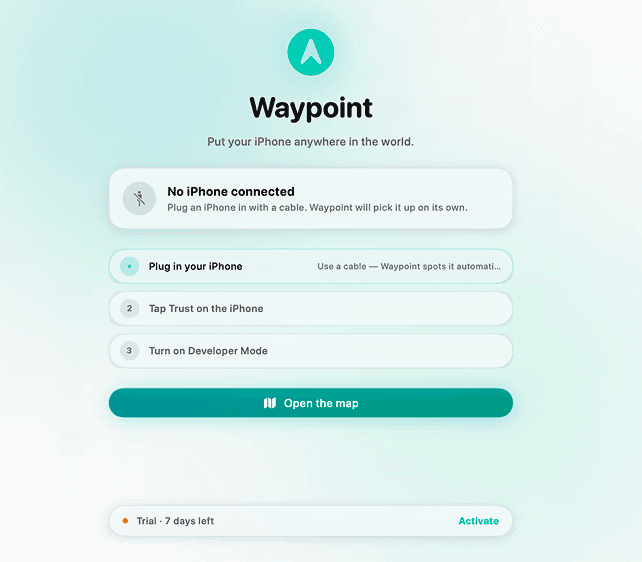
From plugged in to anywhere on earth in under a minute
No jailbreak, no admin password, no developer account — just plug in your iPhone and pick a spot.
Step 1
Plug in your iPhone
Connect it to your Mac with a cable — Waypoint finds it on its own.
Step 2
Pick a spot or a route
Drop a pin, or set a start and end and let it snap to real roads.
Step 3
Go
Your iPhone moves at real speed limits until you stop it.

Step 1
Plug in your iPhone
Connect it to your Mac with a cable — Waypoint finds it on its own.
Step 2
Pick a spot or a route
Drop a pin, or set a start and end and let it snap to real roads.
Step 3
Go
Your iPhone moves at real speed limits until you stop it.
[
pricing
]
Simple pricing, no surprises
Choose the plan that grows with you
Every plan unlocks the whole app. Pick how long you want it for — your key works offline, forever.
Whether you’re creating content solo or collaborating with a team, there’s a plan designed for your workflow.
Popular
Lifetime
Pay once, keep it forever
$34.99
Everything in Monthly
All future updates
Key works offline, forever
No subscription
Popular
Monthly
Try it, cancel anytime
$8.99
Teleport, routes and joystick
Real road speed limits
Stops at lights and stop signs
Cancel any time
Popular
Lifetime
Pay once, keep it forever
$34.99
Everything in Monthly
All future updates
Key works offline, forever
No subscription
Popular
Monthly
Try it, cancel anytime
$8.99
Teleport, routes and joystick
Real road speed limits
Stops at lights and stop signs
Cancel any time
Popular
Lifetime
Pay once, keep it forever
$34.99
Everything in Monthly
All future updates
Key works offline, forever
No subscription
Popular
Monthly
Try it, cancel anytime
$8.99
Teleport, routes and joystick
Real road speed limits
Stops at lights and stop signs
Cancel any time
[
faq
]
Everything you need
to know
Everything you need to know
Straight answers about what Waypoint needs, how it works, and what it will not do.
What is Waypoint?
Waypoint is a Mac app that changes the location your iPhone reports. You can teleport to any spot on the map, follow a real road route at real speed limits, or steer manually with an on-screen joystick. It runs on your Mac and drives your iPhone over a USB cable.
Do I need to jailbreak my iPhone?
Does my iPhone have to stay plugged in?
Which iPhones and iOS versions work?
Do I need an admin password?
Can I use it away from my Mac?
What is Waypoint?
Waypoint is a Mac app that changes the location your iPhone reports. You can teleport to any spot on the map, follow a real road route at real speed limits, or steer manually with an on-screen joystick. It runs on your Mac and drives your iPhone over a USB cable.
Do I need to jailbreak my iPhone?
Does my iPhone have to stay plugged in?
Which iPhones and iOS versions work?
Do I need an admin password?
Can I use it away from my Mac?
What is Verseo?
Verseo is an AI-powered writing assistant that helps you generate, rewrite, and improve content in seconds. From emails and social posts to product descriptions and marketing copy, it helps you create content faster with less effort.
Who is Verseo designed for?
Does my iPhone have to stay plugged in?
Which iPhones and iOS versions work?
Do I need an admin password?
Can I use it away from my Mac?
[
ready to start?
]
Be anywhere in the world today
Plug in your iPhone and drop a pin. Waypoint handles the rest — real roads, real speed limits, real stops at every light along the way.
[
ready to start?
]
Be anywhere in the world today
Turn ideas into polished content in seconds. Generate, refine, and publish faster with AI-powered workflows designed for modern teams.
[
ready to start?
]
Be anywhere in the world today
Turn ideas into polished content in seconds. Generate, refine, and publish faster with AI-powered workflows designed for modern teams.
Waypoint
Waypoint puts your iPhone anywhere in the world — teleport to a pin, or travel real roads at real speed limits. No jailbreak, no admin password.
[ Newsletter ]
Stay connected
© 2026 Waypoint | All Rights Reserved
Waypoint
Waypoint puts your iPhone anywhere in the world — teleport to a pin, or travel real roads at real speed limits. No jailbreak, no admin password.
[ Newsletter ]
Stay connected
© 2026 Waypoint | All Rights Reserved
Waypoint
Waypoint puts your iPhone anywhere in the world — teleport to a pin, or travel real roads at real speed limits. No jailbreak, no admin password.
[ Newsletter ]
Stay connected
© 2026 Waypoint | All Rights Reserved